
TextReplacer - find & replace3.0 - App Store
You'll be able to see results in few seconds.
Publisher Description

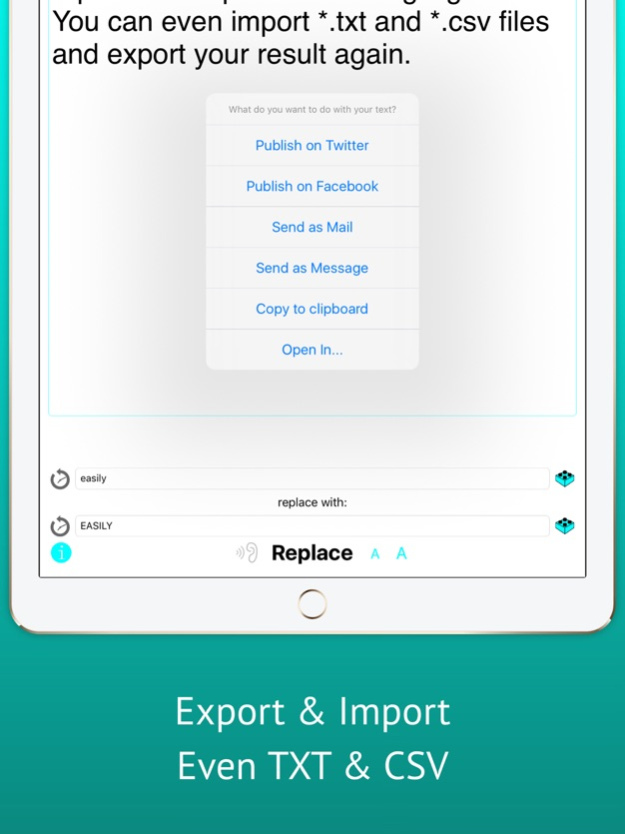
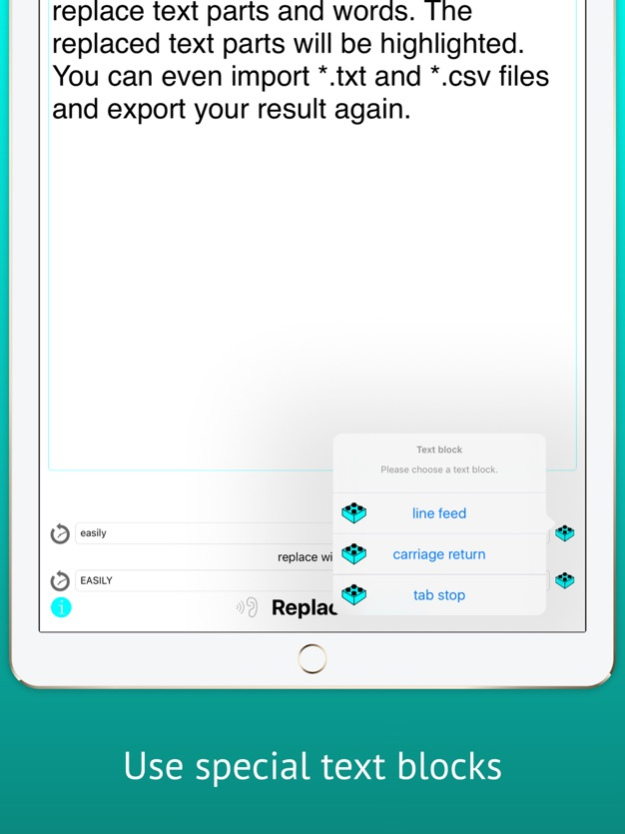
**NEW: import CSV and TXT files & export your result**
Do you ever wanted to replace many identical words or text parts in a text? If so, TextReplacer can replace them all with only one click!
TextReplacer saves you time, you'll never need to replace these text parts or words manually again. You can even replace text blocks like line feed, carriage return and tab stop. Just import CSV or TXT files with "open in...", copy paste or enter your text manually. You can also undo your text replacement. After replacement TextReplacer also highlights the replaced text parts!
You can also export a file with your result or send it by Mail, Message or just copy it to clipboard. TextReplacer also provides a simple history for faster replacement of reoccurring expressions, Text-to-Speech & custom font size.
Version History In this version, an option has been added to voluntarily send the developer a small tip to support the development and maintenance of the app. The option can be found in the settings within the app. 3.0 02/10/2025 Fixed bugs that could cause the keyboard to cover parts of the input fields in certain situations. 2.7 01/27/2025 Minor improvements and bug fixes 2.5 12/09/2024 Support for the new beautiful iPhone X 2.3 11/06/2017 Landscape support for iPad :-) 2.2 06/13/2017 Translations added for French, Chinese, Spanish & Italian 2.1 05/24/2017 - CSV and TXT files can be imported with "open in..."
- result can be exported as file
- text blocks for replacing line feed, carriage return and tab stop added
- bug fixes 2.0 05/02/2017 - New: use the expression "\n" to replace or insert line breaks
- bug fixes 1.80 11/27/2016 german language 1.70 11/01/2016 The field with the text used for replacement can now be empty.
Now you can for example easily remove all blank spaces. Isn't that cool ! ;-) 1.60 08/09/2016 bugfixes 1.50 01/24/2015 - added history
- saves changed font size also if app is restarted 1.40 11/02/2014 - iPhone 6 support 1.32 10/27/2014 - text to speech support 1.31 09/18/2014 - improved layout
- undo highlighting 1.2 09/05/2014 - added iPad support
- added undo action
- highlights the replaced text parts 1.1 12/11/2013 1.0 12/05/2013
About TextReplacer - find & replace
The company that develops TextReplacer - find & replace is Klaus Neuendorf. The latest version released by its developer is 3.0.
To install TextReplacer - find & replace on your iOS device, just click the green Continue To App button above to start the installation process. The app is listed on our website since 2026-10-14 and was downloaded 0 times. We have already checked if the download link is safe, however for your own protection we recommend that you scan the downloaded app with your antivirus. Your antivirus may detect the TextReplacer - find & replace as malware if the download link is broken.
How to install TextReplacer - find & replace on your iOS device:
- Click on the Continue To App button on our website. This will redirect you to the App Store.
- Once the TextReplacer - find & replace is shown in the iTunes listing of your iOS device, you can start its download and installation. Tap on the GET button to the right of the app to start downloading it.
- If you are not logged-in the iOS appstore app, you'll be prompted for your your Apple ID and/or password.
- After TextReplacer - find & replace is downloaded, you'll see an INSTALL button to the right. Tap on it to start the actual installation of the iOS app.
- Once installation is finished you can tap on the OPEN button to start it. Its icon will also be added to your device home screen.
Program Details
System requirements
Download information
Pricing
Version History
version 3.0
posted on 2026-10-14
Version History In this version, an option has been added to voluntarily send the developer a small tip to support the development and maintenance of the app. The option can be found in the settings within the app. 3.0 02/10/2025 Fixed bugs that could cause the keyboard to cover parts of the input fields in certain situations. 2.7 01/27/2025 Minor improvements and bug fixes 2.5 12/09/2024 Support for the new beautiful iPhone X 2.3 11/06/2017 Landscape support for iPad :-) 2.2 06/13/2017 Translations added for French, Chinese, Spanish & Italian 2.1 05/24/2017 - CSV and TXT files can be imported with "open in..."
- result can be exported as file
- text blocks for replacing line feed, carriage return and tab stop added
- bug fixes 2.0 05/02/2017 - New: use the expression "\n" to replace or insert line breaks
- bug fixes 1.80 11/27/2016 german language 1.70 11/01/2016 The field with the text used for replacement can now be empty.
Now you can for example easily remove all blank spaces. Isn't that cool ! ;-) 1.60 08/09/2016 bugfixes 1.50 01/24/2015 - added history
- saves changed font size also if app is restarted 1.40 11/02/2014 - iPhone 6 support 1.32 10/27/2014 - text to speech support 1.31 09/18/2014 - improved layout
- undo highlighting 1.2 09/05/2014 - added iPad support
- added undo action
- highlights the replaced text parts 1.1 12/11/2013 1.0 12/05/2013
version 3.0
posted on 2026-09-04
Version History In this version, an option has been added to voluntarily send the developer a small tip to support the development and maintenance of the app. The option can be found in the settings within the app. 3.0 02/10/2025 Fixed bugs that could cause the keyboard to cover parts of the input fields in certain situations. 2.7 01/27/2025 Minor improvements and bug fixes 2.5 12/09/2024 This app has been updated by Apple to prepare for watchOS 27 compatibility. No new features are included.
Support for the new beautiful iPhone X 2.3 11/06/2017 Landscape support for iPad :-) 2.2 06/13/2017 Translations added for French, Chinese, Spanish & Italian 2.1 05/24/2017 - CSV and TXT files can be imported with "open in..."
- result can be exported as file
- text blocks for replacing line feed, carriage return and tab stop added
- bug fixes 2.0 05/02/2017 - New: use the expression "\n" to replace or insert line breaks
- bug fixes 1.80 11/27/2016 german language 1.70 11/01/2016 The field with the text used for replacement can now be empty.
Now you can for example easily remove all blank spaces. Isn't that cool ! ;-) 1.60 08/09/2016 bugfixes 1.50 01/24/2015 - added history
- saves changed font size also if app is restarted 1.40 11/02/2014 - iPhone 6 support 1.32 10/27/2014 - text to speech support 1.31 09/18/2014 - improved layout
- undo highlighting 1.2 09/05/2014 - added iPad support
- added undo action
- highlights the replaced text parts 1.1 12/11/2013 1.0 12/05/2013
version 3.0
posted on 2026-08-23
Version History In this version, an option has been added to voluntarily send the developer a small tip to support the development and maintenance of the app. The option can be found in the settings within the app. 3.0 02/10/2025 Fixed bugs that could cause the keyboard to cover parts of the input fields in certain situations. 2.7 01/27/2025 Minor improvements and bug fixes 2.5 12/09/2024 This update from Apple will improve the functionality of this app. No new features are included.
Support for the new beautiful iPhone X 2.3 11/06/2017 Landscape support for iPad :-) 2.2 06/13/2017 Translations added for French, Chinese, Spanish & Italian 2.1 05/24/2017 - CSV and TXT files can be imported with "open in..."
- result can be exported as file
- text blocks for replacing line feed, carriage return and tab stop added
- bug fixes 2.0 05/02/2017 - New: use the expression "\n" to replace or insert line breaks
- bug fixes 1.80 11/27/2016 german language 1.70 11/01/2016 The field with the text used for replacement can now be empty.
Now you can for example easily remove all blank spaces. Isn't that cool ! ;-) 1.60 08/09/2016 bugfixes 1.50 01/24/2015 - added history
- saves changed font size also if app is restarted 1.40 11/02/2014 - iPhone 6 support 1.32 10/27/2014 - text to speech support 1.31 09/18/2014 - improved layout
- undo highlighting 1.2 09/05/2014 - added iPad support
- added undo action
- highlights the replaced text parts 1.1 12/11/2013 1.0 12/05/2013
version 3.0
posted on 2025-02-10
Feb 10, 2025
Version 3.0
In this version, an option has been added to voluntarily send the developer a small tip to support the development and maintenance of the app. The option can be found in the settings within the app.
version 3.0
posted on 2025-02-10
In this version, an option has been added to voluntarily send the developer a small tip to support the development and maintenance of the app. The option can be found in the settings within the app.
version 2.3
posted on 2017-11-06
6 Nov 2017 Version 2.3
Support for the new beautiful iPhone X
version 2.3
posted on 2017-11-06
Nov 6, 2017 Version 2.3
Support for the new beautiful iPhone X
version 2.3
posted on 2017-11-06
Nov 6, 2017 Version 2.3
This app has been updated by Apple to use the latest Apple signing certificate.
Support for the new beautiful iPhone X
version 2.3
posted on 2017-11-06
Nov 6, 2017 Version 2.3
This app has been updated by Apple to display the Apple Watch app icon.
Support for the new beautiful iPhone X
version 1.60
posted on 2013-12-05
Disclaimer
Official App Store Link
We do not host TextReplacer - find & replace on our servers. We did not scan it for viruses, adware, spyware or other type of malware. This app is hosted by Apple and passed their terms and conditions to be listed there. We recommend caution when installing it.
The App Store link for TextReplacer - find & replace is provided to you by apps112.com without any warranties, representations or guarantees of any kind, so access it at your own risk.
If you have questions regarding this particular app contact the publisher directly. For questions about the functionalities of apps112.com contact us.
